
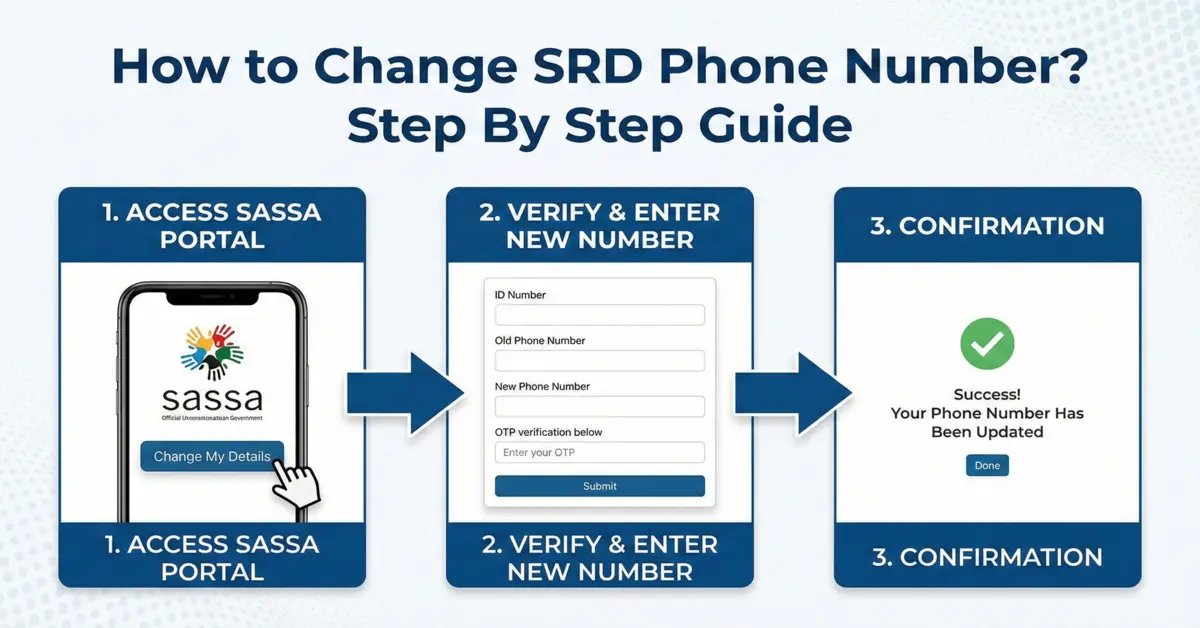
Changing the phone number linked to your SRD grant is simpler than most people fear. Your ID and phone number are the keys to your grant - they receive your OTPs, payment alerts and status updates - so if you have lost your phone or changed your SIM, update your number quickly. This guide covers every official way to change it, step by step.
First: Report a Lost or Stolen Phone
If your phone or SIM was lost or stolen, secure your grant before anything else so nobody can hijack your number:
- Go to srd.sassa.gov.za/sc19/auth and enter your South African ID.
- The system asks whether your cellphone number was changed without your permission - tap Yes.
- You will see a confirmation that your report has been submitted to SASSA.
This protects your payments and notifications while you set up your new number.
What You Will Need
- Your 13-digit South African ID number
- Your Application ID (the 6-digit number SASSA gave you when you applied)
- Your old phone number
- Your new number - active and registered in your own name
- Proof of address (only for an in-person office visit)
Method 1: Change It on the SASSA Website
- Visit srd.sassa.gov.za and find "How do I change my contact details?"
- Click the link to change your contact details.
- Log in with your South African ID and Application ID.
- Enter your email and the new phone number.
- Choose the reason for the change and submit.
- Enter the OTP sent to your new number to verify, then submit again.
Method 2: Forgot Your Application ID? Find It First
- Go to srd.sassa.gov.za/SC19/STATUS and open the SRD Status Check tool.
- Enter your ID and old phone number, then click Check Status.
- Your Application ID appears in the first line of the result.
Now use Method 1 above to update your number.
Method 3: By Email
If you cannot do it online, email srd@sassa.gov.za or grantenquiries@sassa.gov.za. Clearly state your full name, ID number, old number, new number and the reason for the change, and attach a photo of your ID. Allow a few working days for a reply, and check your spam folder.
Method 4: SASSA Call Centre
Call 0800 60 10 11 (free) and tell the agent you want to update your SRD phone number. They will verify your identity (name, ID, old number), update the new number, and you will get a confirmation SMS. Call during working hours, Monday to Friday, 8am to 5pm.
Method 5: At a SASSA Office
Prefer face-to-face help? Take your ID, proof of address and your new (active) number to your nearest office. Staff will give you a form, verify your identity and update the number, and you will receive a confirmation SMS. Go early to avoid queues.
What to Expect After Changing
Once updated, all OTPs, payment alerts and status messages go to your new number. If the confirmation SMS does not arrive, see our guide on when the SASSA OTP does not arrive. Keep your new number active so you never miss a grant message.
What You Should NOT Do
- Do not use a number registered in someone else's name - it can get your SRD grant declined.
- Do not use a foreign number - it must be a South African SIM.
- Never pay anyone to change your number for you - it is free through official channels.
- Do not trust suspicious links or "agents" on social media - only use the official SASSA website and helpline.
📚 Sources & References
Share this guide with someone who needs it.
💬 Comments (0)
No comments yet. Be the first to share your thoughts.
Leave a Comment