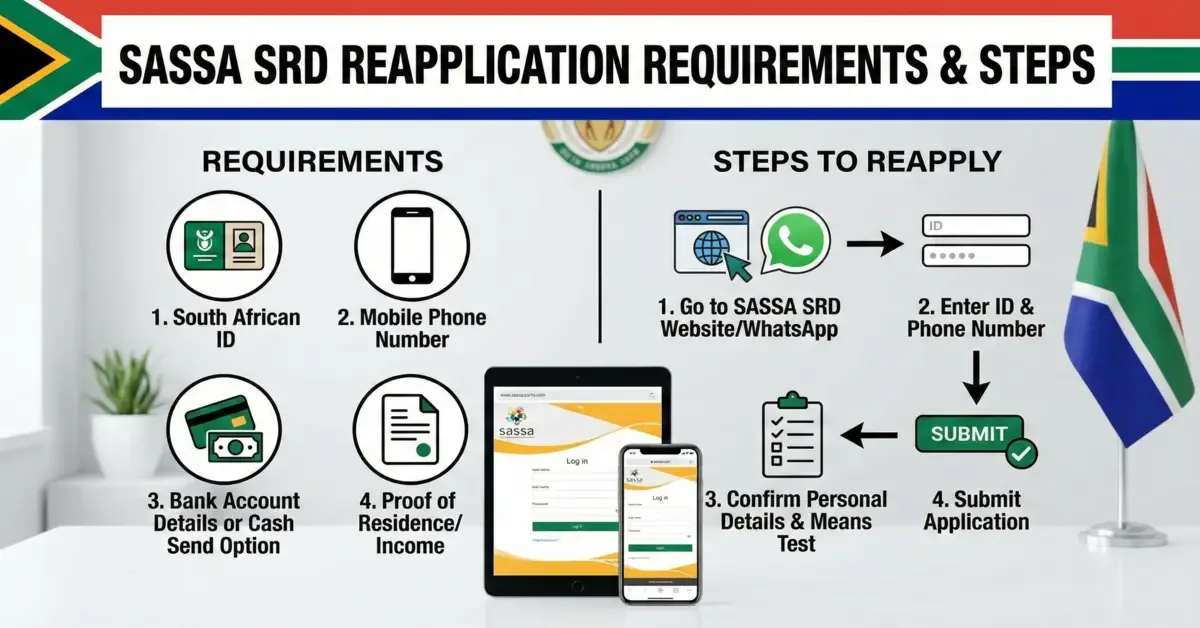
Checking your SRD R370 status is quick, free, and takes about a minute. Go to the official portal at srd.sassa.gov.za, enter your South African ID and the mobile number you applied with, then tap Check Status. In a few seconds you will see exactly where your application stands - Approved, Pending or Declined. On this page we explain what each result really means and the next step to take for each one.
🔍 Check Your SASSA SRD Status
SASSA Payment Date Schedule Of September 2026
SASSA has confirmed the social grant payment dates for the 2026/2027 financial year. Payments are made as early as possible and staggered over three days: the Older Persons Grant on the 2nd, the Disability Grant on the 3rd, and Children's Grants on the 4th of most months. If a payment date falls on a weekend or public holiday, the payment is made on the next working day. The SRD R370 grant has no fixed payment date and is paid later in the month for approved applicants - to find your exact date, check your status regularly.Official source: SASSA media statement, 23 March 2026 - verify on SASSA News (Facebook).If you want to apply for the SASSA SRD grant, you must meet the eligibility requirements. Check the full SASSA SRD Eligibility Criteria here.
| Grant Type | Payment Date | Amount | Increase |
|---|---|---|---|
| Old Age Grant (60-74 Years) | 02 Sep 2026 | R2,400 | No increase |
| Old Age Grant (75+ Years) | 02 Sep 2026 | R2,420 | No increase |
| Disability Grant | 03 Sep 2026 | R2,400 | No increase |
| Care Dependency Grant | 04 Sep 2026 | R2,400 | No increase |
| War Veterans Grant | 02 Sep 2026 | R2,420 | No increase |
| Foster Child Grant | 04 Sep 2026 | R1,290 | No increase |
| Child Support Grant | 04 Sep 2026 | R580 | No increase |
| Grant-in-Aid | 02 Sep 2026 | R580 | No increase |
| SRD Grant | 20-30 Sep | R370 | No increase |
- SRD payments usually come at the end of the month.
- Payday is usually between 20th to 30th, when SASSA will send your payment. It can take 2 to 3 working days of processing.
- Check your status regularly. SASSA adds paydays after approval. It's better to check your status after the middle of the month.
- Only check your payment date through official tools or websites.
Full SASSA Payment Schedule (2026/2027)
The complete approved payment dates for every month of the 2026/2027 financial year, for the Older Persons, Disability and Children's grants.
| Month | Older Persons | Disability | Children's Grants |
|---|---|---|---|
| April 2026 | 02 April 2026 | 07 April 2026 | 08 April 2026 |
| May 2026 | 05 May 2026 | 06 May 2026 | 07 May 2026 |
| June 2026 | 02 June 2026 | 03 June 2026 | 04 June 2026 |
| July 2026 | 02 July 2026 | 03 July 2026 | 06 July 2026 |
| August 2026 | 04 August 2026 | 05 August 2026 | 06 August 2026 |
| September 2026 | 02 September 2026 | 03 September 2026 | 04 September 2026 |
| October 2026 | 02 October 2026 | 05 October 2026 | 06 October 2026 |
| November 2026 | 03 November 2026 | 04 November 2026 | 05 November 2026 |
| December 2026 | 02 December 2026 | 03 December 2026 | 04 December 2026 |
| January 2027 | 05 January 2027 | 06 January 2027 | 07 January 2027 |
| February 2027 | 02 February 2027 | 03 February 2027 | 04 February 2027 |
| March 2027 | 02 March 2027 | 03 March 2027 | 04 March 2027 |
Grant Amount Calculator
These are the official SASSA grant amounts for 2026, confirmed in the Budget Speech and the SASSA media statement. From April 2026, the Older Persons, Disability and Care Dependency grants increased by R80 to R2,400; the War Veterans Grant by R80 to R2,420; the Foster Child Grant by R40 to R1,290; and the Child Support Grant and Grant-in-Aid by R20 to R580. Select any grant below to compare the previous amount with the current amount.Official source: SASSA media statement, 23 March 2026 - verify on SASSA News (Facebook).
What the Different SASSA Statuses Mean
Your SASSA status tells you which stage your SRD grant application has reached - whether it has been approved, is still pending, or has been declined. Below we break down every status you might see and explain, in plain language, what each one means for your payment.
How to Check Your SASSA Status in 2026 (All Methods)
You can use the status tool above, or use any of the official methods below. These are the ways that actually work in 2026 - including options that need no data, no internet, and no smartphone, so you can check your status no matter what phone you have.
- Check SASSA Status Via Official Portal: Go to the official SASSA SRD website srd.sassa.gov.za. Look for the section of "Check Status" or "Check Status Online." Enter your South African ID number and the mobile number you entered when applying. Click the "Submit" or "Check Status" button. Wait a few moments. Now, your SRD status for different months will appear on the screen.
- Check SRD Grant Status Via USSD CODE: Open the Phone app on your mobile. Now Dial *120*69277# or *120*3210#, then press the call button. A menu will pop up on your screen. Choose the option that says "SASSA Status" or "SRD Status". Now enter your ID number and phone number. The system will show your SRD status for the current month on your screen.
- Check SRD Status By Using WhatsApp: First save 082 046 8553 to your phone contacts. This is the official SASSA WhatsApp number. Start a new chat with the number you just saved. Type a word like "SASSA" or "Status" and send it to begin. SASSA will send you questions. Just reply by choosing the right options. You will have to give your South African ID number and the cellphone number you used when you applied.
- Check SRD Status Via Moya App: First, download the official SASSA app from a trusted source like the Google Play Store or Apple App Store. Make sure it's the real SASSA app. Once downloaded, install the app on your phone. Open the app and sign up or log in if you are already a beneficiary. Go to the section of "Check Status". Now, enter your South African ID number and the mobile phone number you gave during registration. Tap "Submit" or "Check Status." The system will show your R370 grant status on the screen right away.
- SRD R370 Status Check By Visiting SASSA Office: Use the official SASSA website or call their helpline to locate the office closest to you. Take your South African ID and mobile number. Visit the office on a weekday during working hours to avoid any struggle. Once inside, go to the help desk or information counter and ask to check your SRD R370 grant status. Share your ID number and cellphone number with the SASSA staff when asked. The staff will check the system and tell you whether your application is Approved, Pending, or Declined.
- Check Your Grant Status By a Phone Call: Dial the SASSA toll-free number 0800 60 10 11 from your phone. Carefully listen to the instructions and select the option for the SRD grant or status check. The system will ask you to enter your South African ID number and registered cellphone number. The system or call agent will tell you the current status of your application, whether it's Approved, Pending, or Declined.
- Check SRD Grant Status with an MTN SIM (No Data Required): Checking SASSA SRD grant status using an MTN SIM is simple and easy. This SIM does not need any data and there is no need to have a smartphone. Dial the USSD code *134*7737# on your MTN phone. A prompt screen will appear, select the relevant option to check your grant status. Now enter your details by entering your South African ID number and mobile number. After submitting your details, the system will display your status.
How To Check Identity Verification For SRD R370 Grant
When you apply for the SASSA SRD R370 grant, your identity is verified. This means SASSA checks your personal information with the Department of Home Affairs (DHA) to make sure everything is correct. This step is very important to move your application forward. There is no separate platform for identity verification. SASSA includes your identity status in your main SRD application. You can check your verification by using the official SASSA Status Check platform.
Identity Verification Status Messages
- Pending DHA Verification — It means SASSA is still checking your ID details with Home Affairs.
- Identity Verification Failed — This means SASSA could not match your information with DHA records.
- Referred — SASSA could not match your details with DHA records and verification needs review.
- Awaiting Identity Verification — The authorities are still checking your identity.
- Long-term Pending — A long Pending status indicates that the identity verification process is taking too much time.
How to Fix Identity Verification Issues
- Check Your Information — Make sure your ID number, name, and surname are exactly the same as on your South African ID. Sometimes small mistakes can cause problems.
- Update DHA Records — If you recently changed your name and the DHA department has not updated the information, the system will not find your information. You will have to fix that with DHA first.
- Contact SASSA — If your identity keeps failing even though your details are correct, contact SASSA by calling 0800 60 10 11 or visit your nearest office for help.
How to Change Or Update Payment Method
If you want to receive your SASSA SRD R370 grant through a different bank account or payment option, you can update your payment method by following these steps.
- Go to the SASSA Website — Visit the official SRD website. Scroll down to the "How do I change my banking details" section, usually found at the bottom of the web page.
- Enter Your South African ID Number — Type in your ID number in the space provided.
- Receive an SMS — SASSA will send a secure link via SMS to your phone. Open the link to update your details and choose your new payment method.
- Choose Bank Account or CashSend — Enter the bank account number, bank name and account type. CashSend or mobile wallet options are only applicable when you don't have a bank account.
- Confirm & Submit — Check your information carefully then click submit. Make sure the bank account is in your name.
- Only bank accounts registered in your own name will be accepted.
- If your bank details don't match your ID, payments may be delayed or not processed.
- If you use a cellphone number for CashSend, make sure it's registered to your name.
- After updating, changes can take up to 30 days to reflect.
- You have opened a new bank account.
- Your old bank account has been closed or is inactive.
- Your bank account is in someone else's name.
- Your status shows Bank Details Pending.
Why Haven't You Received Payment After SASSA Grant Approval?
If your R370 grant is approved but no money has arrived, you are not alone - this is one of the most common problems beneficiaries face. Here are the usual reasons for the delay, and how to fix each one.
Why Is My SASSA Grant Status Still Pending After 3 Months?
If your SASSA status has stayed on Pending for several months, it usually means your application is still being reviewed. But there are a few common reasons it can take longer than normal - and simple steps you can take to move things along.
Can SASSA Block Your SRD Grant Without Notice?
SASSA can temporarily block your SRD grant at any time. In many cases they do it without giving notice. The SASSA department does not always send an SMS or letter manually before stopping the grant. Sometimes the system automatically raises issues and blocks the payment. But it is the beneficiary's duty to regularly check the status on the official website or app to stay updated.
- Visit the SRD Status Check page often.
- If status is blocked, then complete identity or banking verification.
- Update your personal and financial details through the SASSA portal.
- If you believe the block was a mistake, appeal online within 30 days.
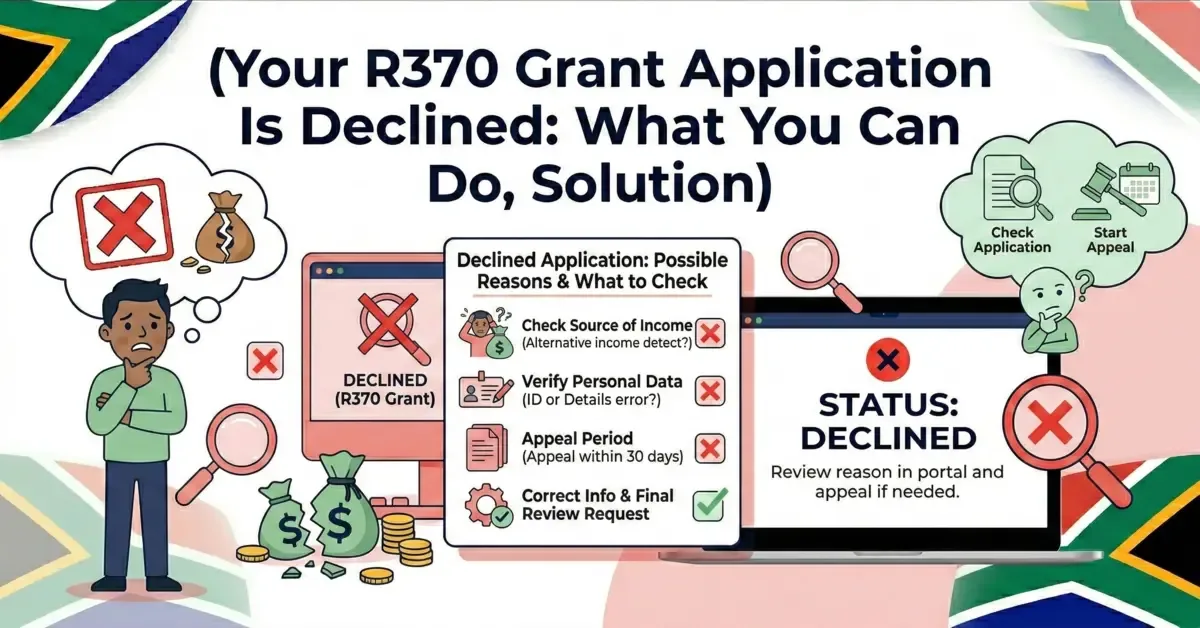
What To Do If Your SRD Grant Is Declined?
If your SASSA SRD grant application was declined, you still have the right to appeal and get your grant reviewed. It is a simple process, and many beneficiaries successfully receive their grant after appealing. Follow the step by step guide on How To Do An Appeal On Decline to submit your appeal correctly and increase your chances to get grant approval.
Common Reasons for Decline
- Your monthly income is higher than the SASSA-allowed limit of R624 per month.
- Bank records show deposits above the allowed limit.
- You are receiving another government grant such as UIF or NSFAS.
- Your identity details could not be verified with DHA records.
- You are formally employed or have a declared income source.
How to Submit an Appeal
- Go to srd.sassa.gov.za — Visit the official SASSA SRD website and look for the Appeals section on the page.
- Enter Your ID and Mobile Number — Provide your South African ID number and the mobile number you used when you registered for the grant.
- Select the Declined Month — Choose the specific month for which your application was declined and which you are now appealing.
- Choose Your Appeal Reason — Select the reason for your appeal from the available options. Add any supporting information if required.
- Submit and Note Your Reference Number — Submit your appeal. An independent tribunal will review your case and notify you via SMS within 60 to 90 days.
How to Contact SASSA If You Need Help
If your grant is late or you want to update your details or want to make an appeal, the following options will show you easy ways to contact SASSA and get the help you need.
📚 Sources & References
Share this guide with someone who needs it.